
Frictionless Multi-step Checkout for WooCommerce
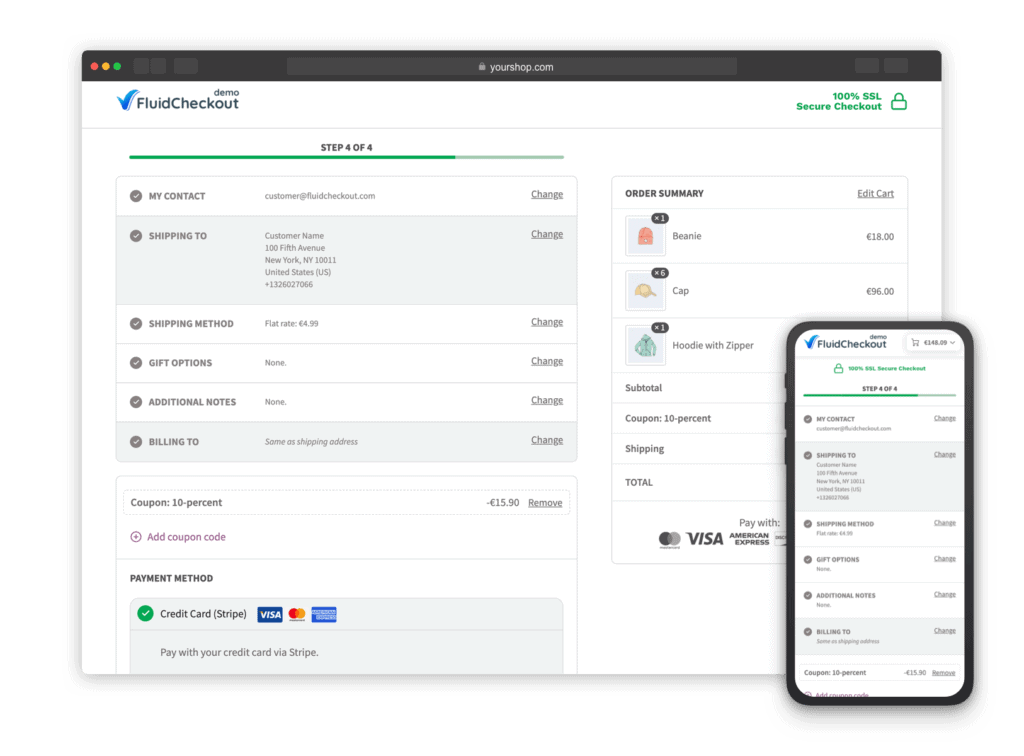
Replace WooCommerce cart, checkout and order received with a consistent, intuitive purchase experience — less friction where it matters most.
30-day money-back guarantee on PRO plans.
- 20,000+ stores
- 4.9 rating on WordPress.org
- 150+ five-star reviews
- up to 36% increased conversions
- Multi-step or one-step checkout
- Instant field validation
- Auto-save & skip completed steps
- Optimized cart & thank-you pages PRO
- Express checkout in one place PRO
- Edit cart at checkout PRO
- Design templates PRO
★★★★★
“conversion rate increased by 36%”
★★★★★
“this was the best”
★★★★★
“converting one very easily”
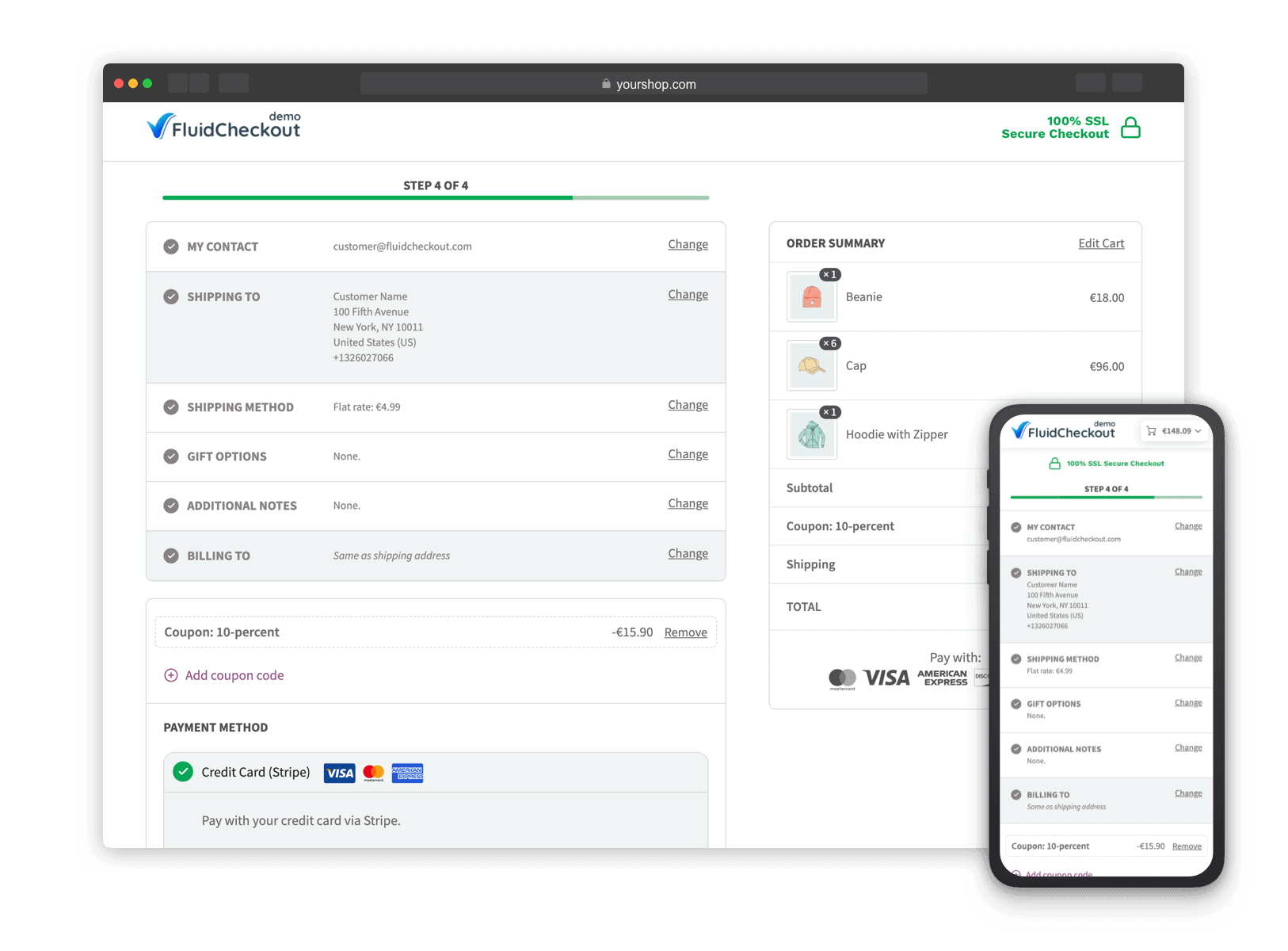
A consistent purchase journey
Cart, checkout, and order received — one layout from first click to thank-you.

Default WooCommerce checkout leaves money on the table.
The default checkout has a lot of shortcomings — long forms, late validation, and a purchase journey that feels pieced together. Fluid Checkout was built so every WooCommerce store deserves better.
Without Fluid Checkout
- Long single-page form with ~16 open fields overwhelms shoppers
- Fields only validate on Place order — late, frustrating errors
- Shipping vs billing order feels backwards for most stores
- Optional fields compete for attention and add friction
- Mobile checkout hides order summary and key actions
- Cart, checkout and thank-you pages feel inconsistent
With Fluid Checkout
- Multi-step or one-step layouts that guide one decision at a time
- Instant field validation and clear feedback as customers type
- Shipping address before billing (or reverse with PRO)
- Hidden optional fields with easy “Add” reveals (~40% fewer open fields)
- Mobile-first checkout with accessible order summary
- Consistent cart → checkout → order received experience with PRO
How it works
Install
Install Fluid Checkout Lite free from WordPress.org, or activate PRO on your store in minutes.
Configure
Pick multi-step or one-step, tune fields, trust symbols and integrations to match your theme.
Convert
Ship a faster, clearer checkout — and unlock cart-to-thank-you consistency with PRO.
Everything that makes checkout convert
What every WooCommerce checkout page needs
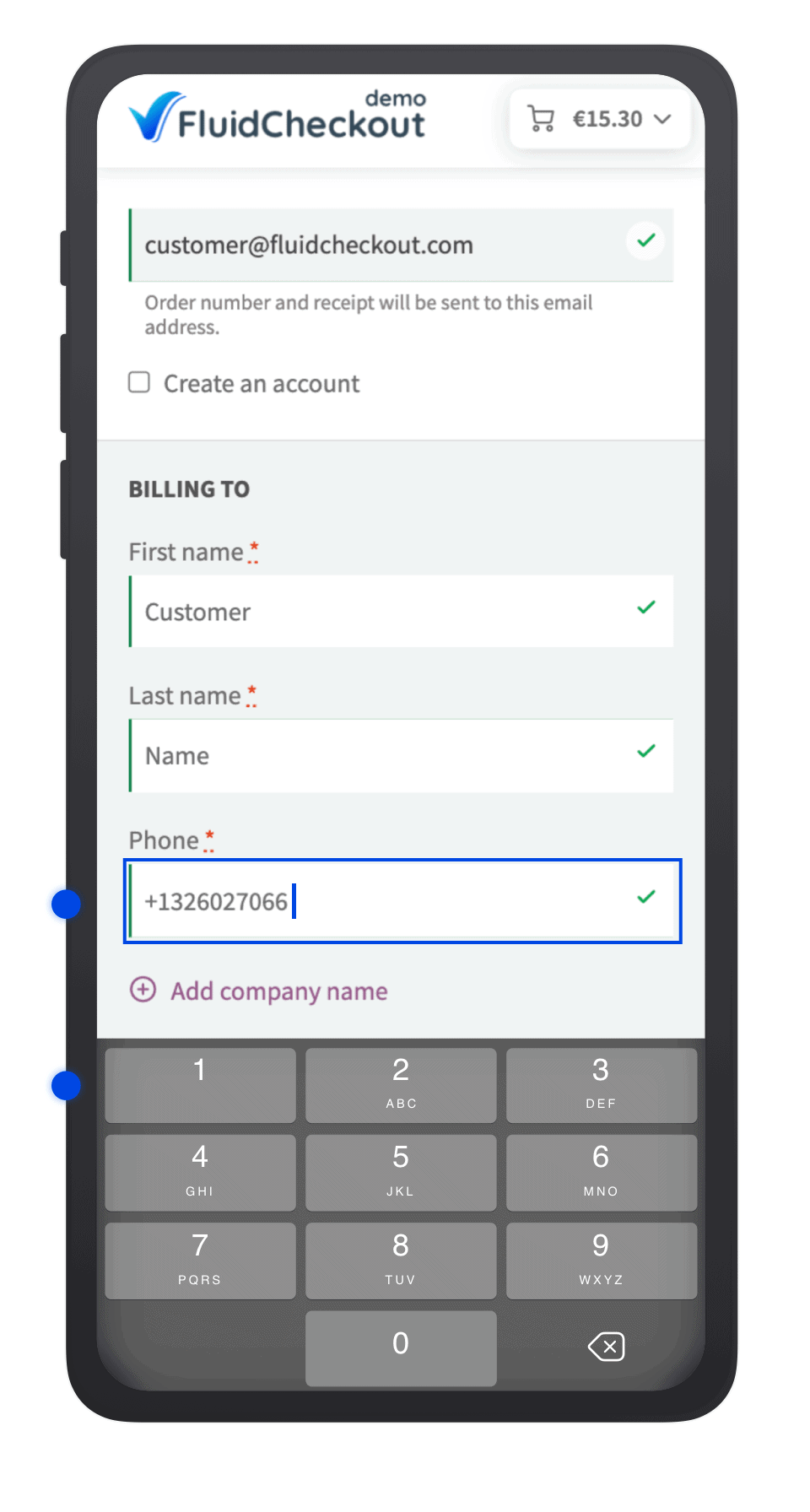
Optimized WooCommerce mobile checkout
-
Order summary
Easily accessible by taping the cart button on the checkout page header
-
On-screen keyboards
Numeric for phone, @ and .com for email
-
Mobile first
Created as a mobile checkout, then enhanced for bigger screens
Don’t lose sight of any important information at the checkout, even on small mobile screens. The order summary is easily accessible by taping the cart button on the checkout page header.
On mobile devices, Fluid Checkout surfaces the most appropriate on-screen keyboard for each field. For instance, the numeric keyboard is displayed for phone fields, and for the email field, a keyboard with @ and .com is presented instead.
In fact, Fluid Checkout was created as a WooCommerce mobile checkout experience and enhanced with more functionality, improved styles, and better layout appropriate for bigger screens.
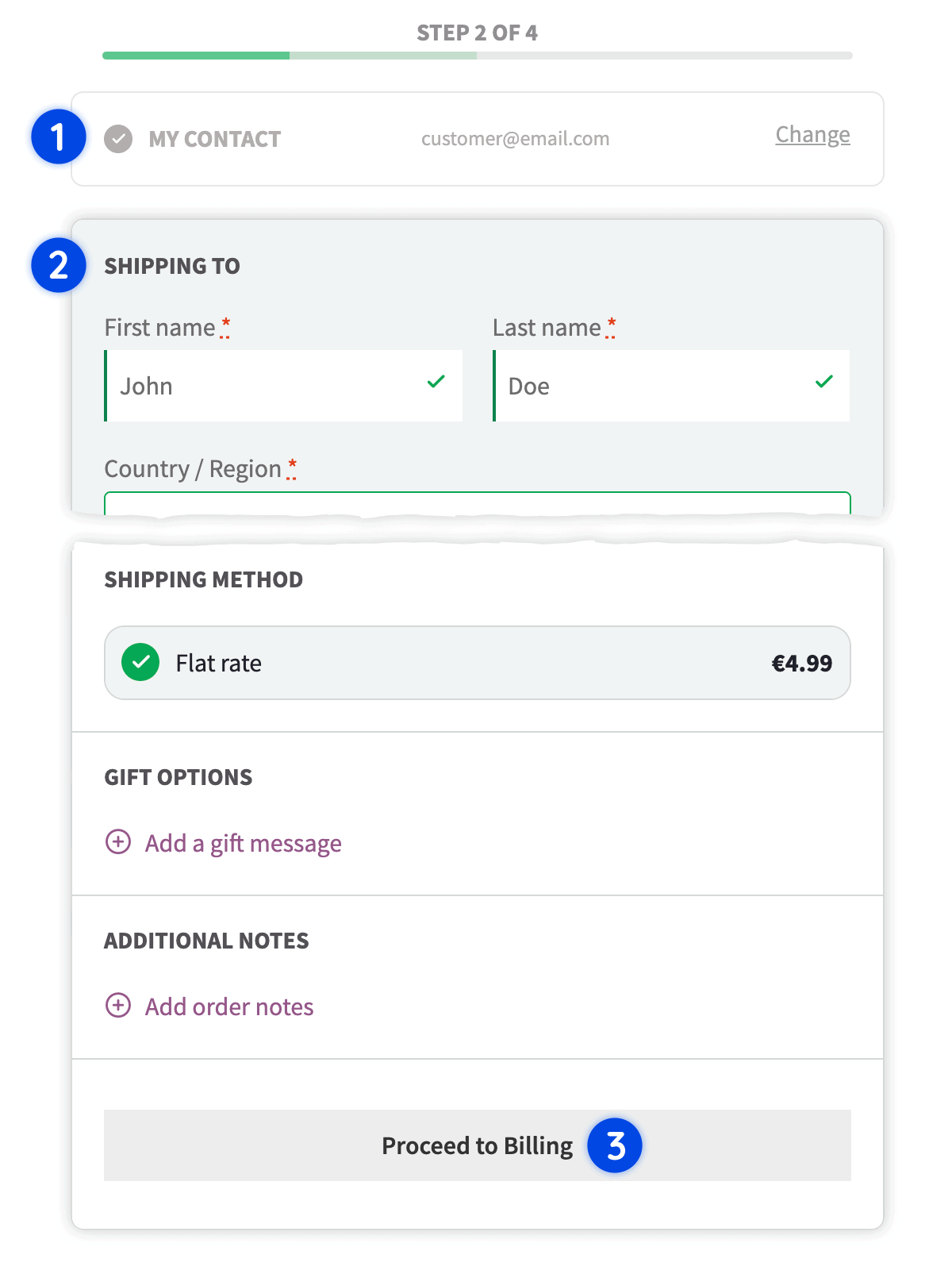
Ask for shipping address before billing
-
Natural order
Request each piece of information at the right moment
-
Shipping first
Where to send the goods, not the invoice
-
Same address
Copied automatically to billing when it matches
Offer a natural shopping experience to your customers by requesting each piece of information at the right moment.
When customers first get to the checkout page, they are thinking about where to send the goods and not which address to put in the invoice if they even need one.
If the address is the same for shipping and billing, it will be automatically copied to the billing address.
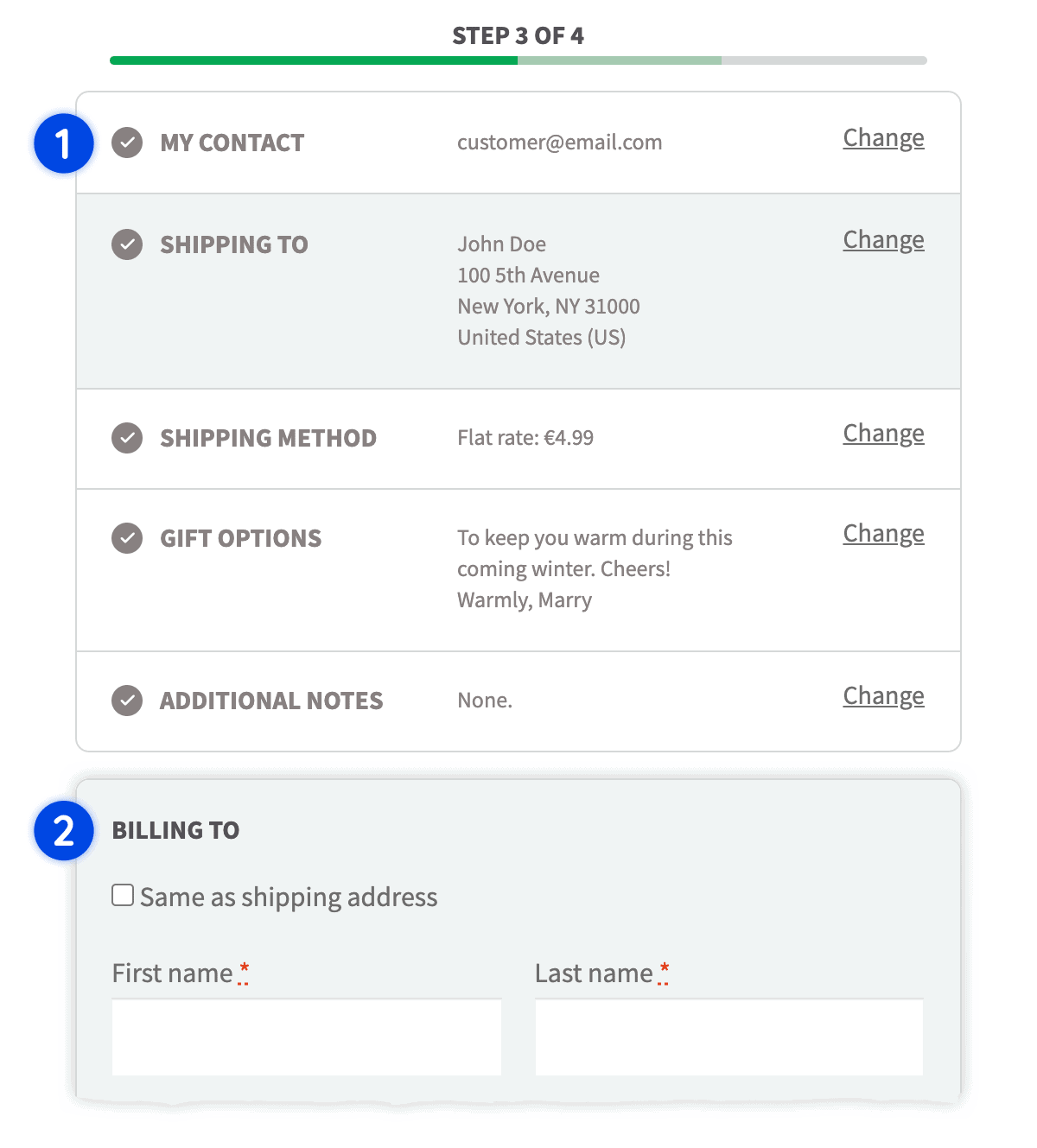
Customer’s data saved automatically
-
Saved to the session
They get back exactly where they left
-
Refresh or return
Accidental refresh or abandoned checkout
-
Payment excluded
Payment information won’t be saved
Isn’t it annoying when the salesperson forgets your name or call you someone else? Don’t be that person.
Your customer’s data is automatically saved to their session and they will get back exactly where they left. Being it because of an accidental page refresh or abandoned checkout, you won’t forget any of the customer’s data.
There is one exception: for security reasons, payment information won’t be saved.
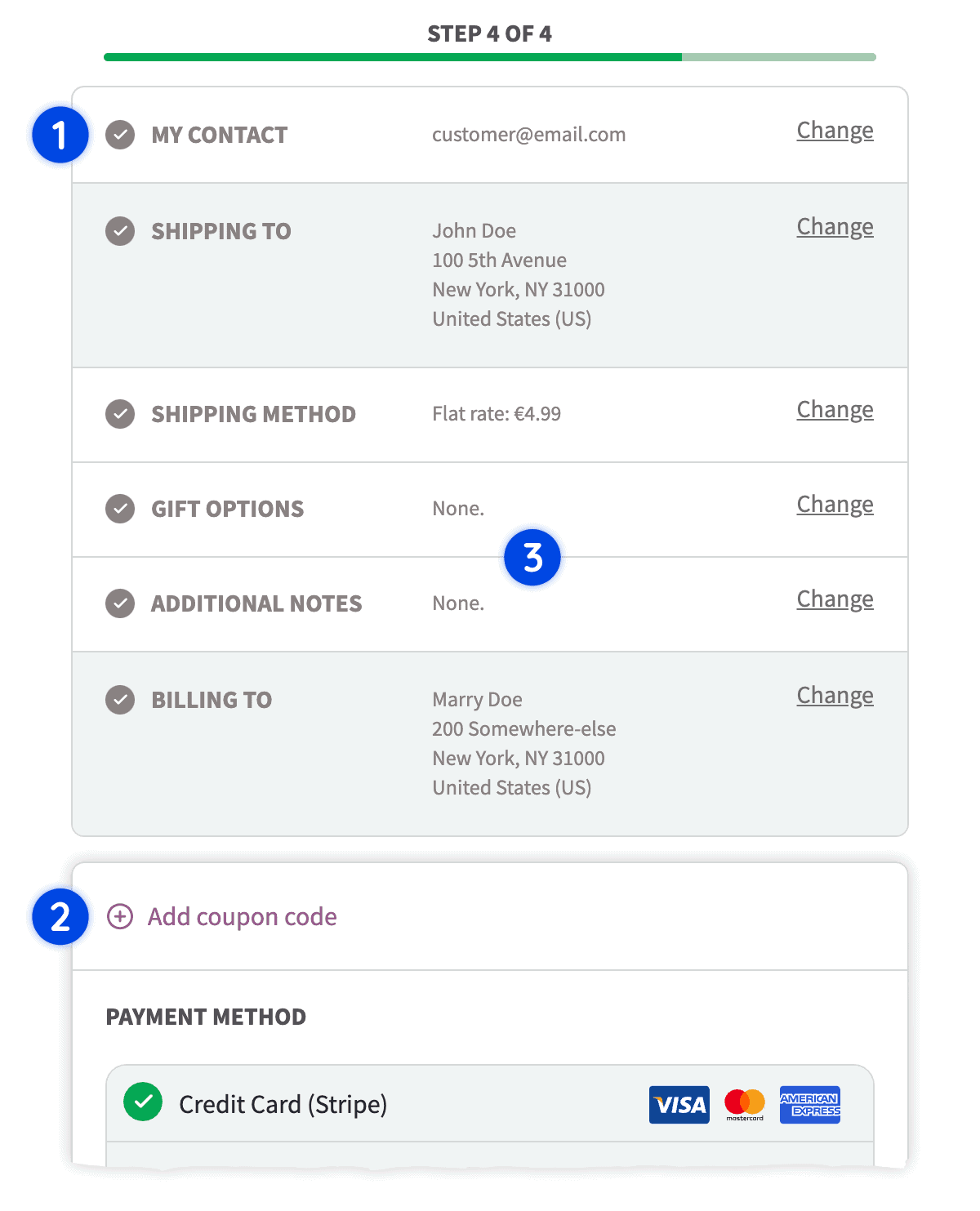
Skip completed steps with step review sections
-
Skip completed
Required information already provided and validated
-
Step review
Review and change any of the information
-
Same device
Abandoned checkouts can pick up again
Repeat customers will love how easy it is to complete their next purchase.
Fluid Checkout skips the steps which have all required information already provided and validated, and it provides an easy way to review and change any of the information.
This also works for new customers who abandoned the checkout and, hopefully, came back to complete their purchase from the same device.
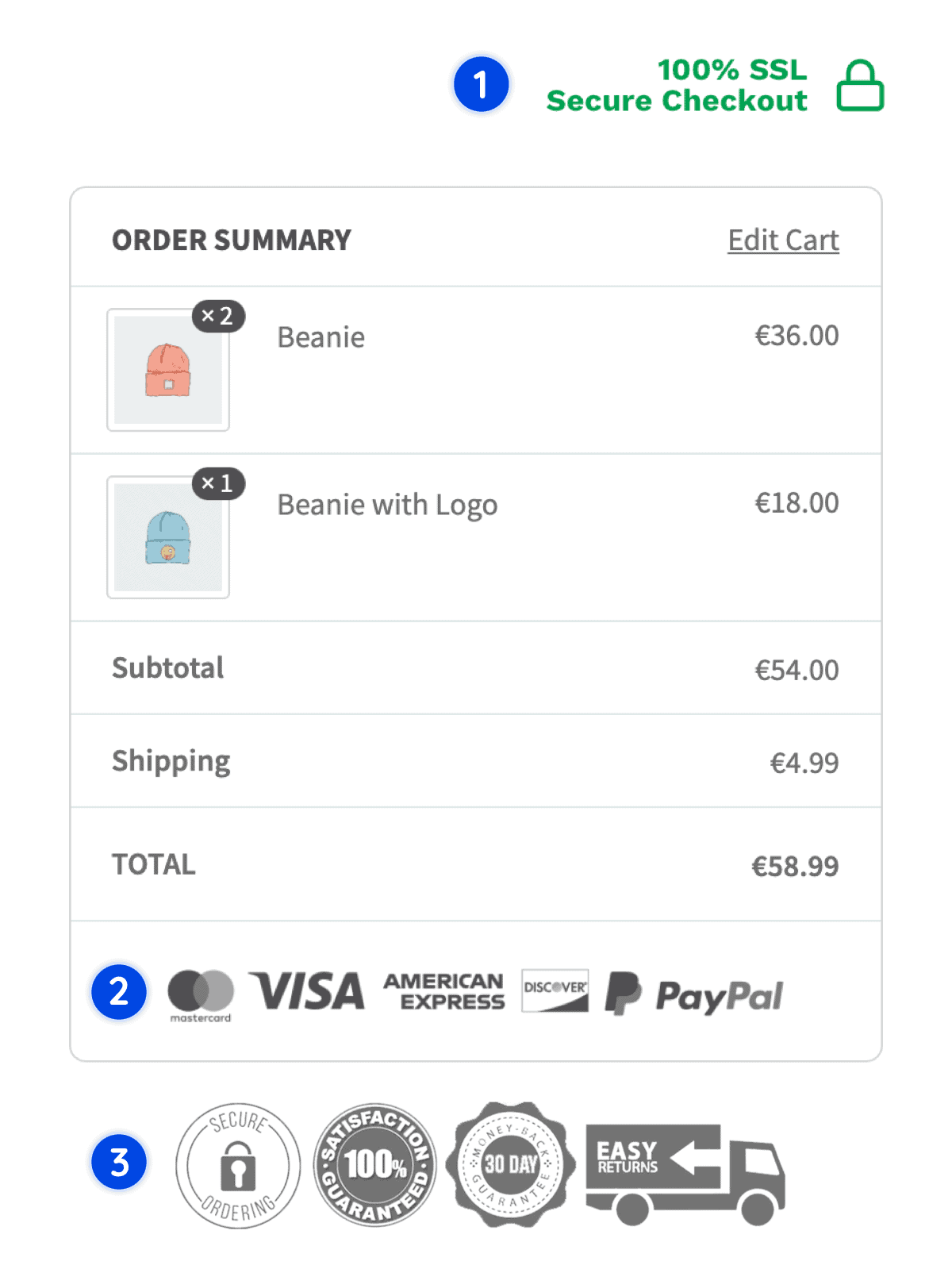
Easily add trust symbols to the checkout page
-
Checkout header
Desktop and mobile widget areas
-
Order summary
Trust next to the totals
-
Checkout sidebar
A dedicated widget area
Boost the perceived trust customers have on your website.
Add any trust symbol to the checkout page such as guarantees, accepted payment methods, security badges, reviews, testimonials, or anything really.
Fluid Checkout provides widget areas at strategic positions that can be used to add trust symbols to the checkout page: Checkout Header – Desktop, Order Summary, Checkout Sidebar, and Checkout Header – Mobile.
Choose between multi-step and one-step checkout layouts
-
Multi-step
Primarily a WooCommerce multi-step checkout
-
One-step
One-page checkout when it converts better
-
Your website
Still looks and feels like your own store
Fluid Checkout is primarily a WooCommerce multi-step checkout.
However, depending on the type of products or services you sell, you can benefit from better conversion rates by choosing a one-step layout (a.k.a one-page checkout, or single-step checkout).
While Fluid Checkout replaces the layout of the WooCommerce checkout page, it still looks and feels like your own website.
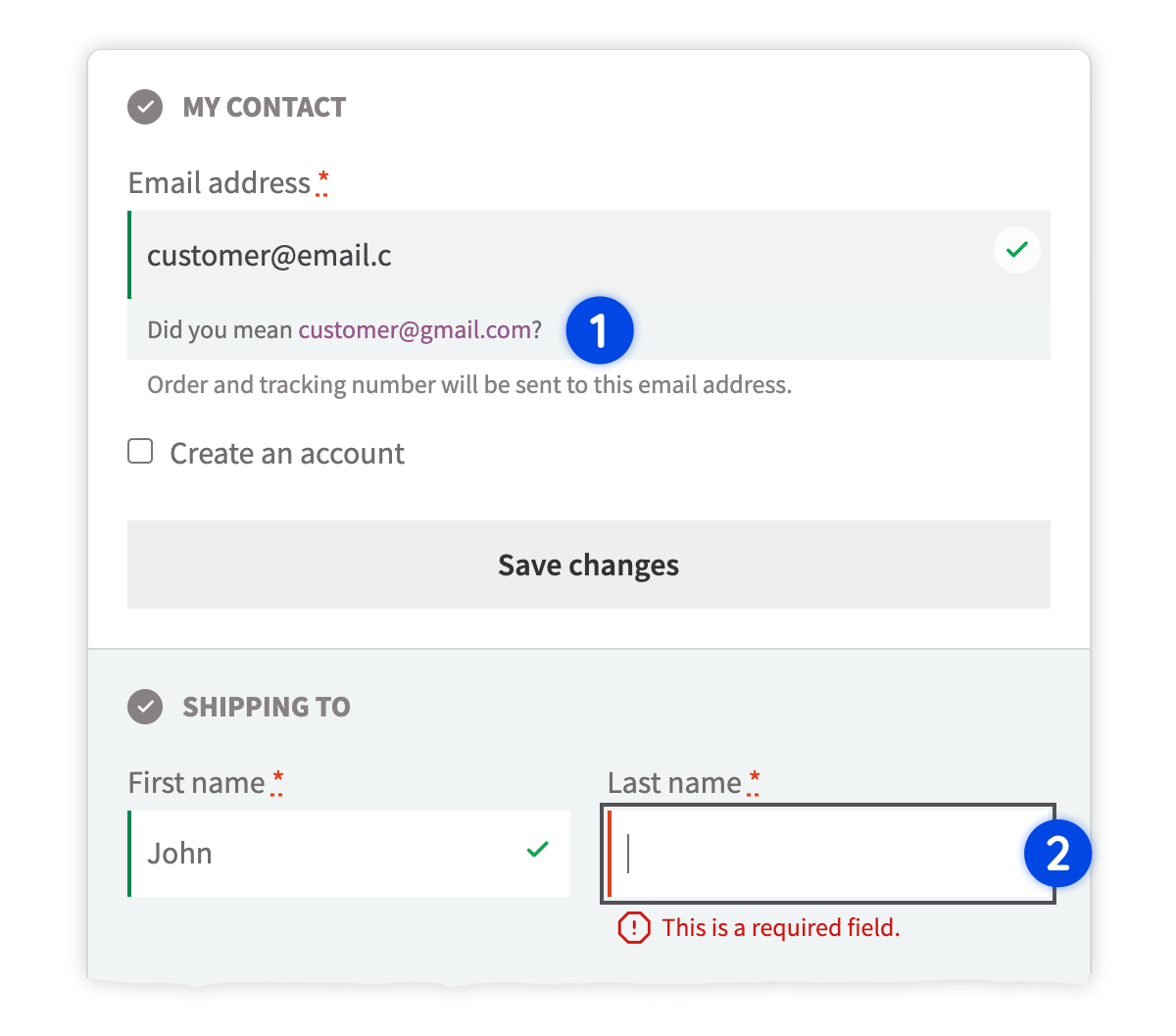
Instant field validation and feedback
-
Instant feedback
Most errors prevented before Place Order
-
WooCommerce default
Only validates when the form is submitted
-
Place Order last
The last thing they interact with
While, some fields can only be validated when placing the order, such as credit card and other payment information, most errors at checkout can be prevented by instantly validating the customer’s data and giving feedback.
The default WooCommerce checkout only validate fields when the form is submitted, leading to confused and frustrated customers.
When customers click the “ Place Order” button, they expect it to be the last thing they interact with before the purchase is completed.
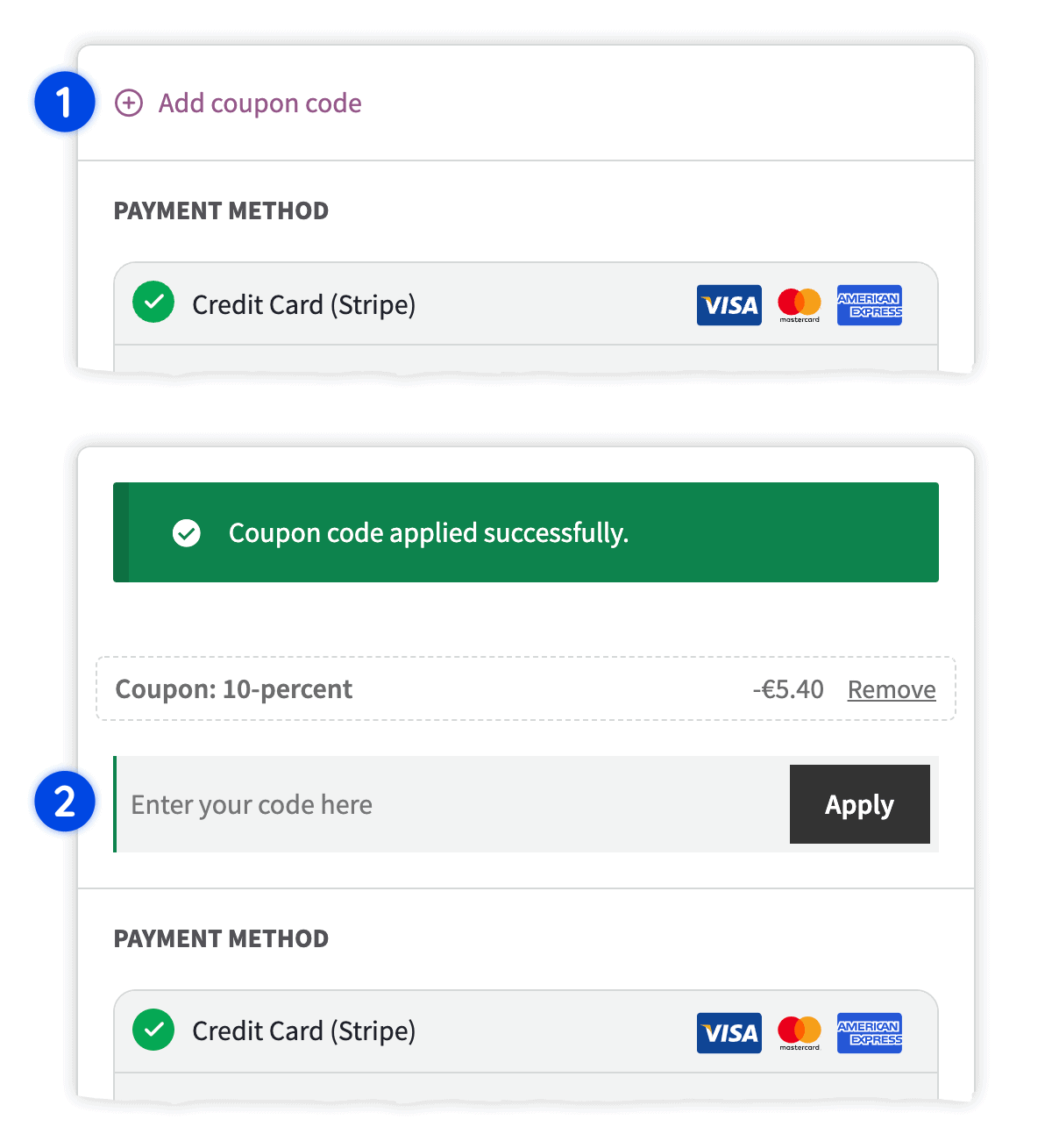
Integrated coupon code field at checkout
-
Expansible section
Displayed just like other optional fields
-
Less distracting
Leverage coupons without drawing attention away
-
Still discoverable
Ready for those who already have a code
Leverage coupon codes in a way that does not distract your customers.
The integrated coupon code field is displayed in an expansible section, just like other optional fields.
While less noticeable it is still easily discoverable for those who already have a coupon code and want to apply it.
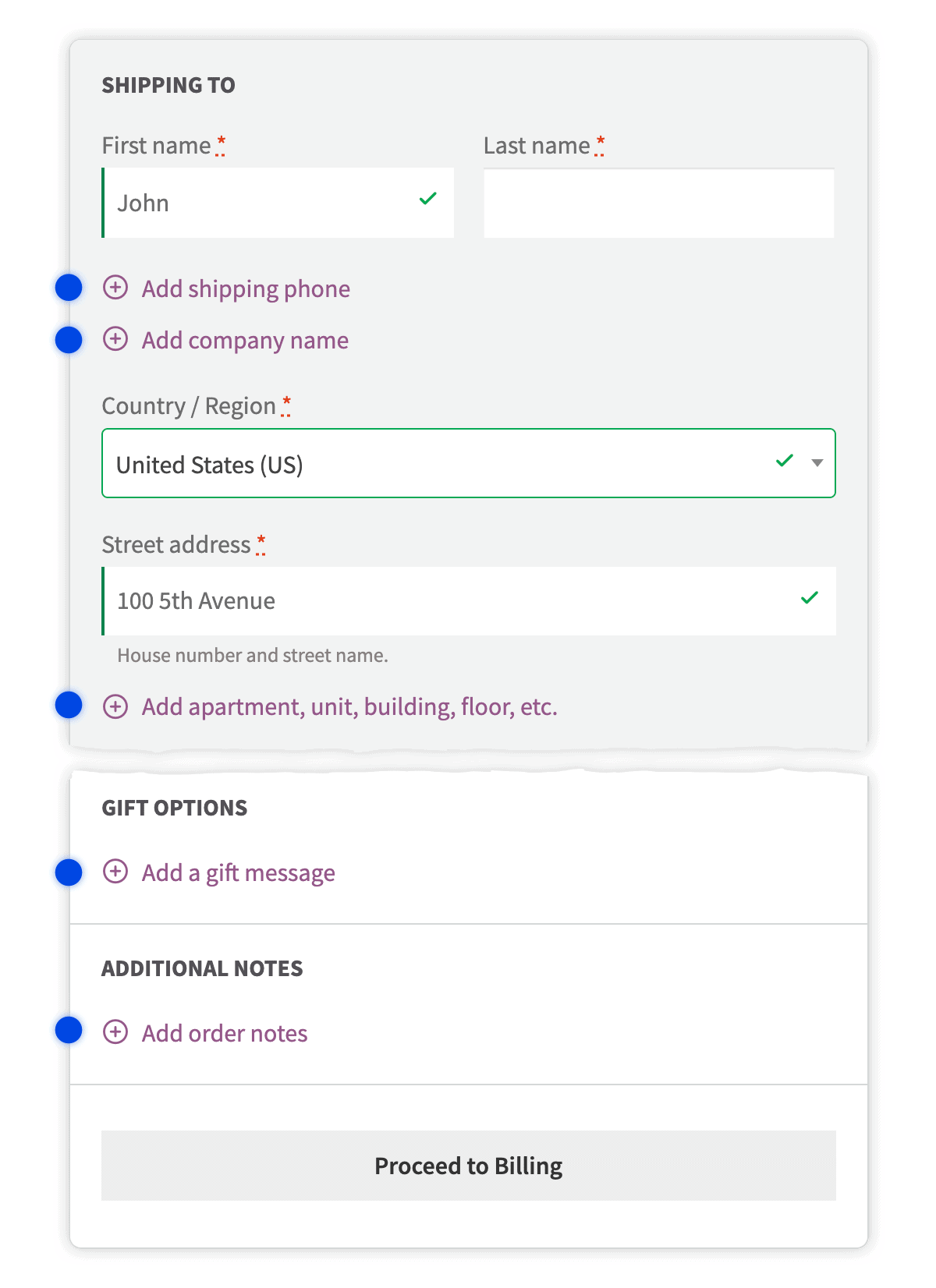
Hidden optional fields
-
Roughly 40% fewer
From 16 to about 9 open checkout fields
-
Optional stays hidden
Company, Address line 2, Phone, Order notes, Coupon code
-
Add when needed
Reveal with the “Add” link buttons
While filling up forms online, the user’s attention is disproportionately drawn towards open form fields, and the average WooCommerce checkout page has 16 open text fields, many of which are optional.
Examples of these optional fields are the “ Company“, “ Address line 2“, “ Phone“, “ Order notes“, and “ Coupon code“.
By removing optional fields from the immediate view we can go from 16 to about 9 open checkout fields, a reduction of roughly 40%. Those who need these fields can easily find and click the “Add” link buttons to reveal the field.
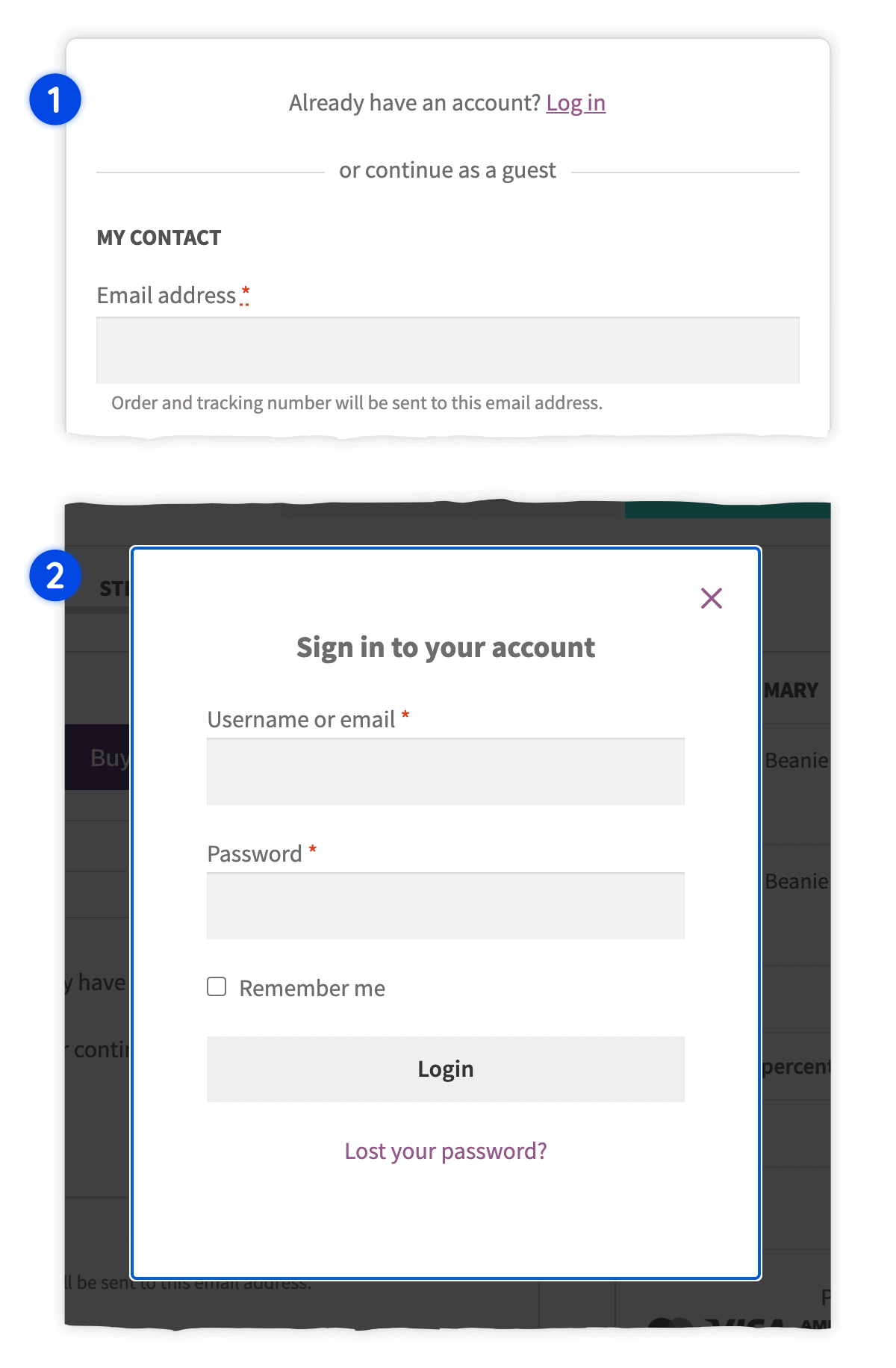
Log-in without leaving the checkout
-
From checkout
Log in without having to visit another page
-
Repeat customers
Use the account they already registered
Repeat customers with an account registered can log in from the checkout page directly without having to visit another page.
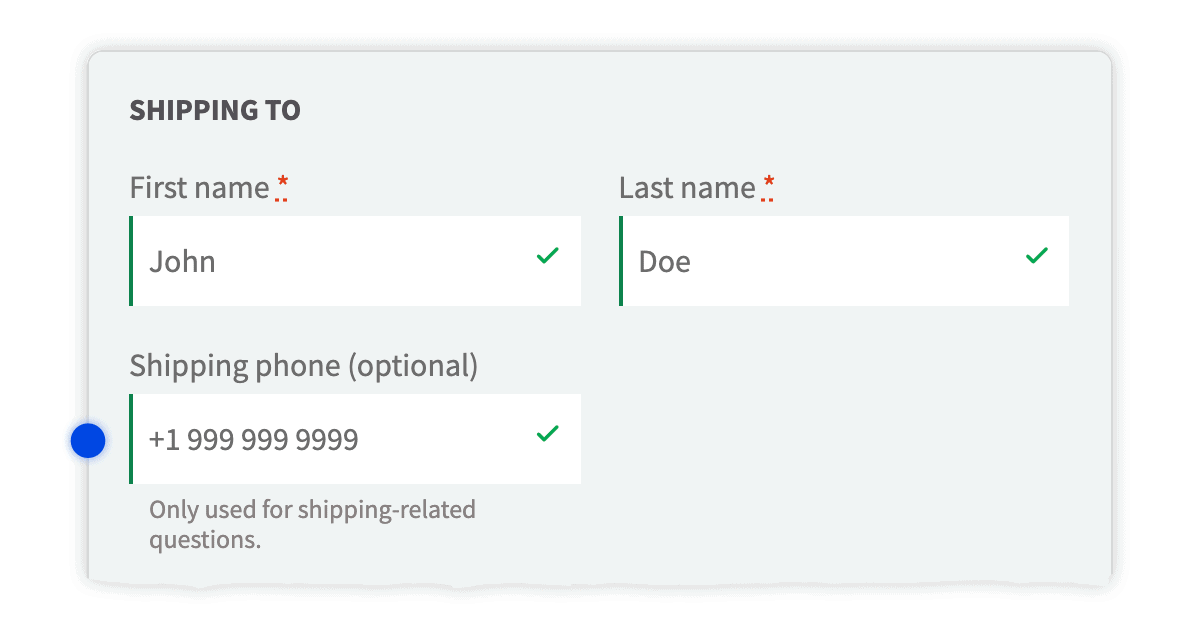
Shipping phone field
-
Separate field
For shipping-related questions
-
Plus billing phone
In addition to the built-in billing phone field
-
WooCommerce 5.6+
Compatible with core Shipping Phone support
Add a separate phone field for shipping-related questions, in addition to the built-in billing phone field.
It is compatible with the Shipping Phone support feature added by WooCommerce in v5.6.
Offer a consistent purchase experience with Fluid Checkout PRO
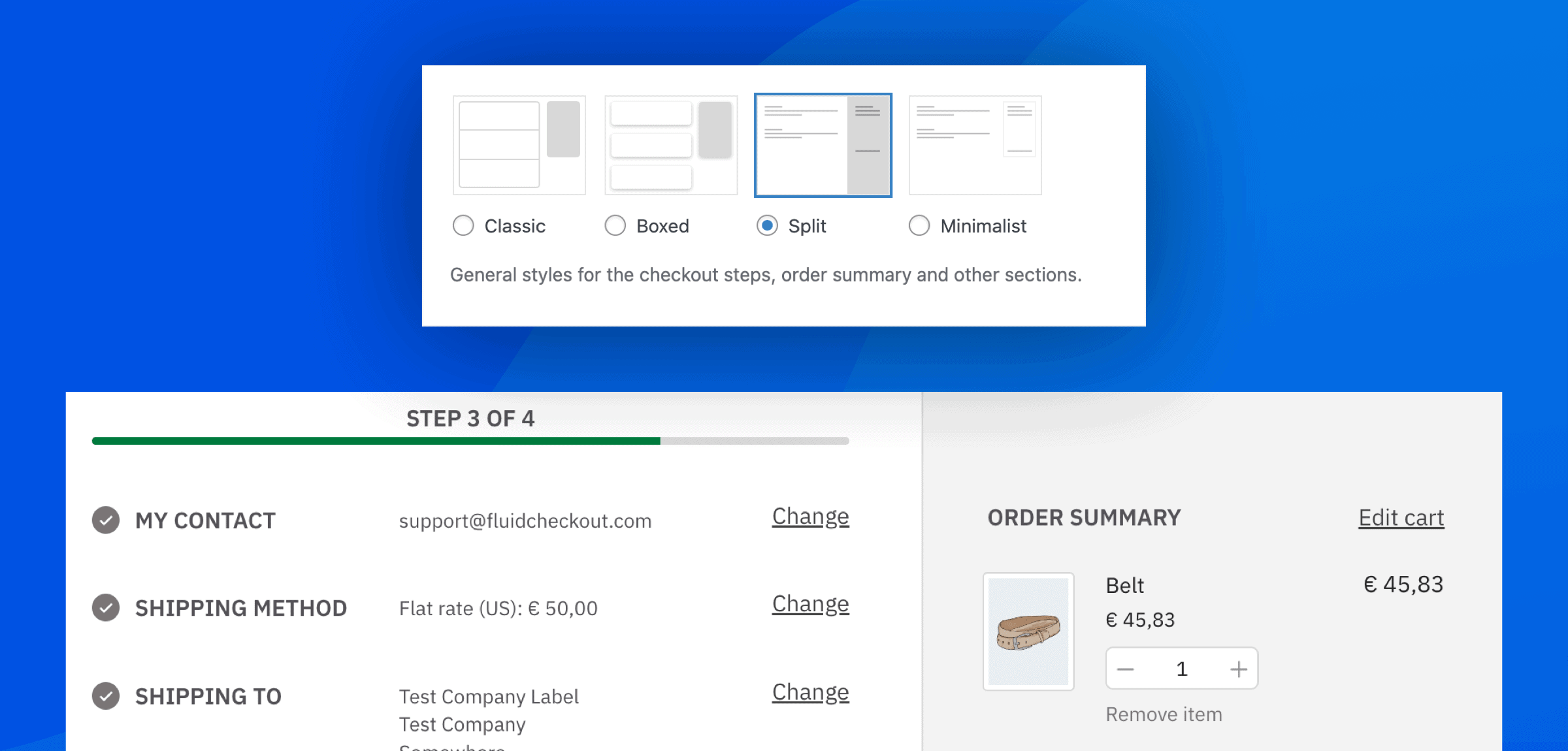
Design templates: Classic, Boxed, Split and Minimalist
-
Classic
The default template — also available with Lite
-
Boxed & Minimalist
Separate boxes per completed step, or a borderless look
-
Split
Shopify-like order summary column (2-column layout)
Whether you want a sleeker checkout or a look closer to Shopify, PRO unlocks design templates so the purchase journey matches your brand.
Classic is the default Fluid Checkout template (also in Lite). Boxed gives each completed step its own box. Minimalist removes borders for a cleaner page — especially with black buttons. Split separates the order summary from the steps with a line, or a full-height color on the right.
These styles apply across pages optimized with PRO: checkout, cart, order received, and view-order on the account. Split is not available with the 1-column layout.
Optimized cart page
-
Always updated
Contents and totals, even from another browser tab
-
Mobile quantity
Plus and Minus buttons; inline out of stock and backorder
-
More on the cart
Trust symbols, coupon field, shipping section, upsells, undo, Address Book
Never click that pesky “ Update cart” button again with cart contents and totals updated automatically, even when cart items change from another browser tab.
The optimized cart page has: always updated cart contents and totals; quantity field optimized for mobile with “Plus” and “Minus” buttons; inline cart item validation for products out of stock and on backorder; easily add trust symbols to the cart page; integrated coupon code field on the cart page; shipping methods and calculation as a separate section; cart upsells/cross-sells layout (from WooCommerce product settings); re-add / undo multiple removed items; saved addresses for the shipping calculator, when using the Address Book add-on.
Optimized order received / thank you page
-
Same look and feel
Order received and account view-order pages
-
Overview first
Relevant actions, status progress bar, notes, payment instructions
-
Optional sidebar
Order summary, plus extra information on the page
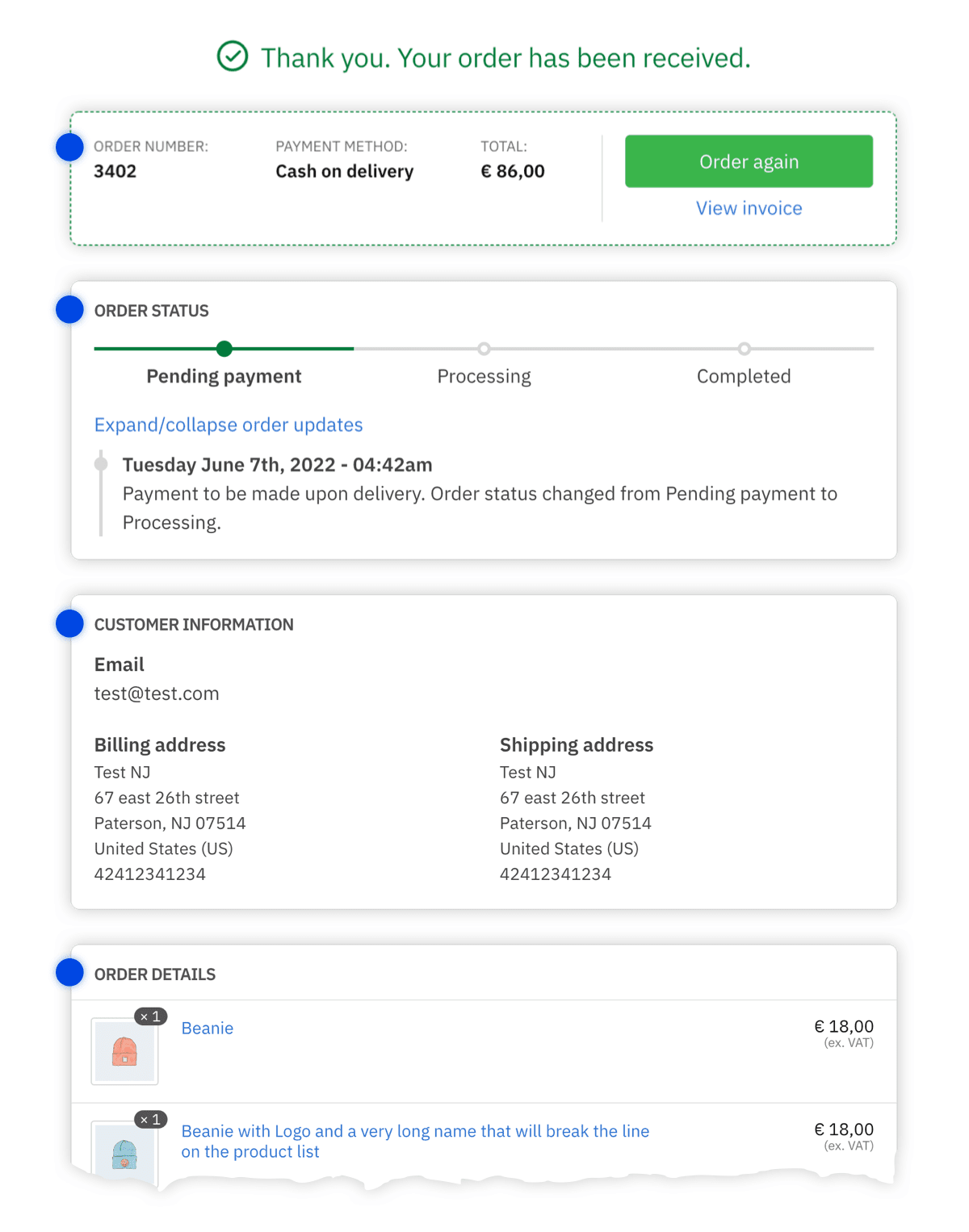
The same look and feel for order details on the order received page and view order pages on the account dashboard.
The optimized order received / thank you page has: order overview with relevant actions; status progress bar and customer notes; payment methods instructions displayed when relevant; order summary optionally displayed on the sidebar; easily add extra information on the order received page.
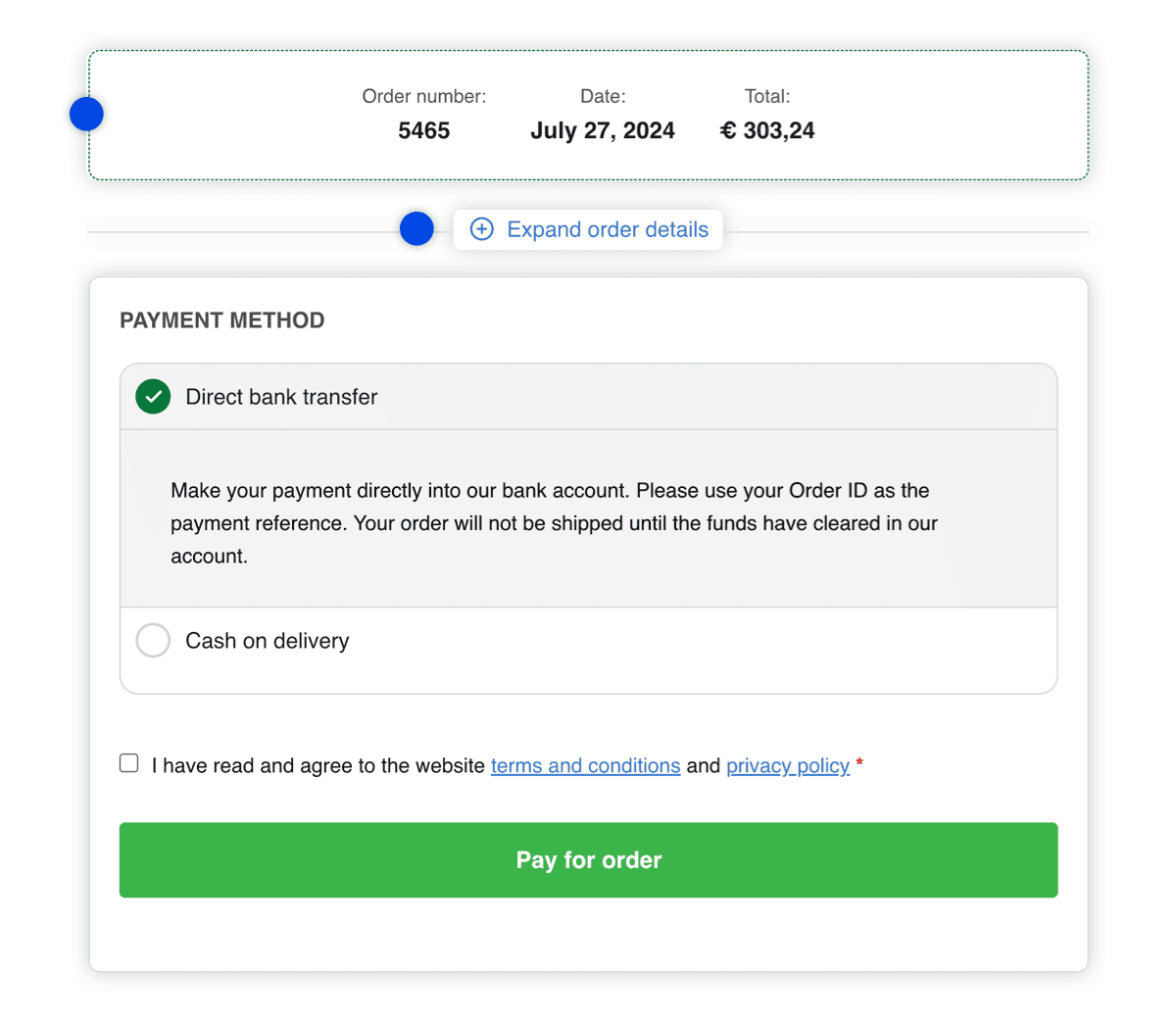
Order pay page
-
Overview at the top
The most relevant information first
-
Checkout-consistent
Layout consistent with the checkout page
-
Expansible details
Confirm all details; add trust symbols on this page
Streamline your pay for order process with a modern, intuitive order pay page designed for a seamless and fluid checkout experience.
The optimized WooCommerce order pay page offers: order overview with the most relevant information at the top; layout consistent with the checkout page; customers can confirm all details with the expansible order details section; easily add trust symbols to the order pay page.
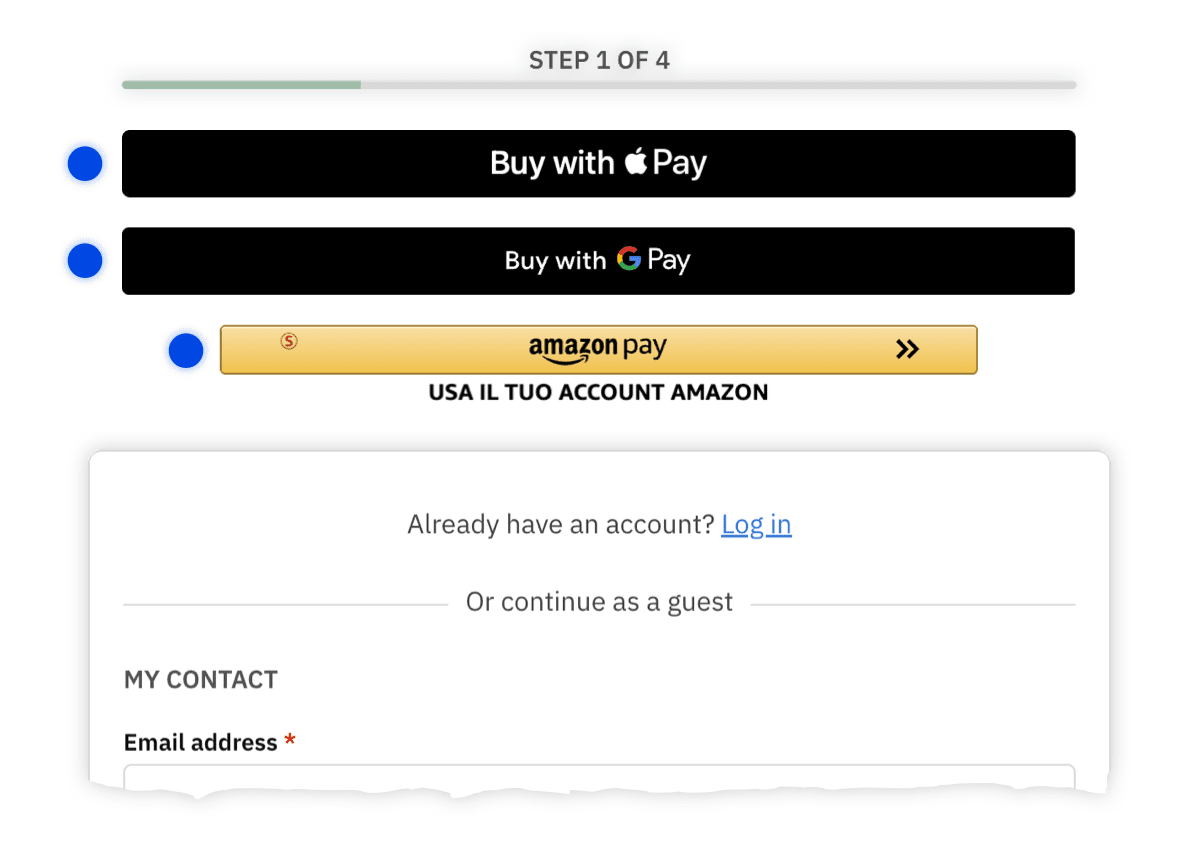
Integration with Express Checkout payment methods
-
Scattered by plugin
Each payment method adds buttons in a different way
-
One expected place
Compatible plugins display buttons where customers expect them
Each payment method that supports express checkout buttons adds its buttons in a different way, sometimes in places where it does not make a lot of sense.
With Fluid Checkout PRO, the express checkout buttons from compatible plugins are all displayed on the same place, where the customer would expect it to be.
Edit cart contents at checkout
-
At checkout
Edit quantity or remove items from the cart
-
Correct a mistake
Before completing the purchase
Let customers edit quantity of cart items or remove items from their cart directly at the checkout page.
Super helpful in case customers want to correct a mistake before completing the purchase.
Integrated coupon code field at checkout
-
Expansible section
Just like other optional fields
-
Still discoverable
Ready for those who already have a code
-
More positions
PRO adds more options of positions for the field
Leverage coupon codes in a way that does not distract your customers.
The integrated coupon code field is displayed in an expansible section, just like other optional fields. While less noticeable it is still easily discoverable for those who already have a coupon code and want to apply it.
With Fluid Checkout PRO you have more options of positions to display the coupon code field.
Integrated coupon code field on the cart page
-
On the cart
Apply a code before they reach checkout
-
Not distracting
Same expansible pattern as optional fields
-
Separate from checkout
A cart field — not the checkout coupon field
Leverage coupon codes on the cart without an always-open field that sends shoppers off to hunt for discounts.
PRO adds an integrated coupon code field on the optimized cart page, in an expansible section like other optional fields. It stays discoverable for customers who already have a code.
This is distinct from the checkout coupon field (Lite and PRO). The cart field is a PRO cart-page option.
Local pickup and in-store collection
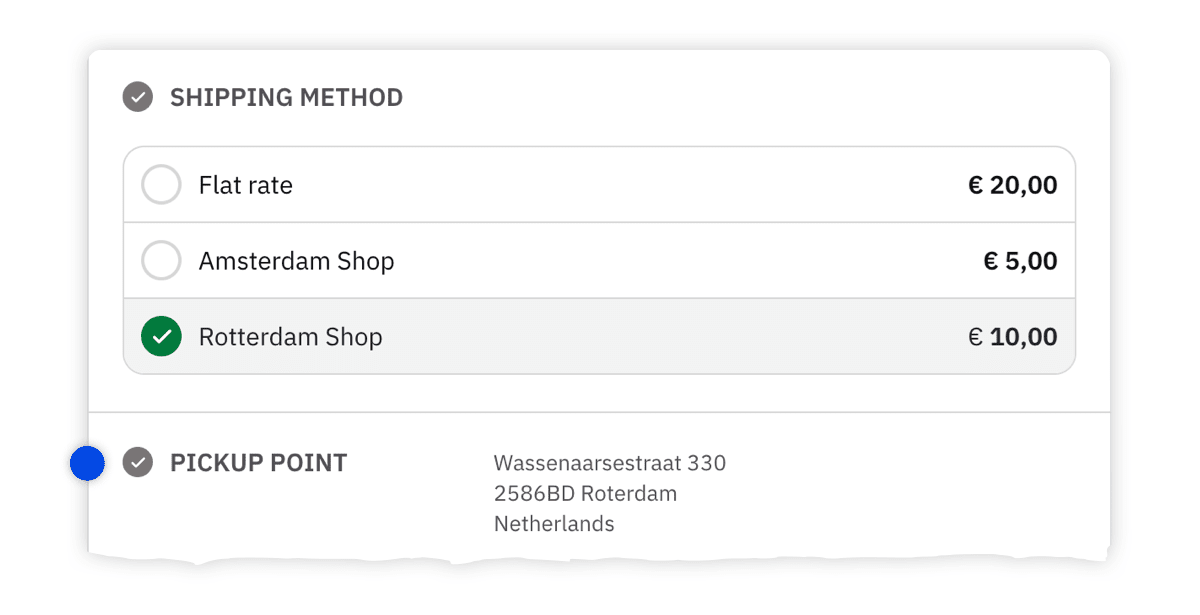
-
Hide shipping fields
When local pickup or in-store collection is selected
-
No shipping address
Products are delivered in the physical store or collection location
Remove the shipping fields from the checkout page when the customer selects a local pickup or in-store collection delivery method.
There is no need to ask customer for a shipping address because the products will be delivered to them in the physical store or collection location.
Ask for billing address before shipping
-
Gifts and B2B
Invoice address first when delivery is to someone else
-
Same as billing
The checkbox moves to the shipping section automatically
-
PRO positions
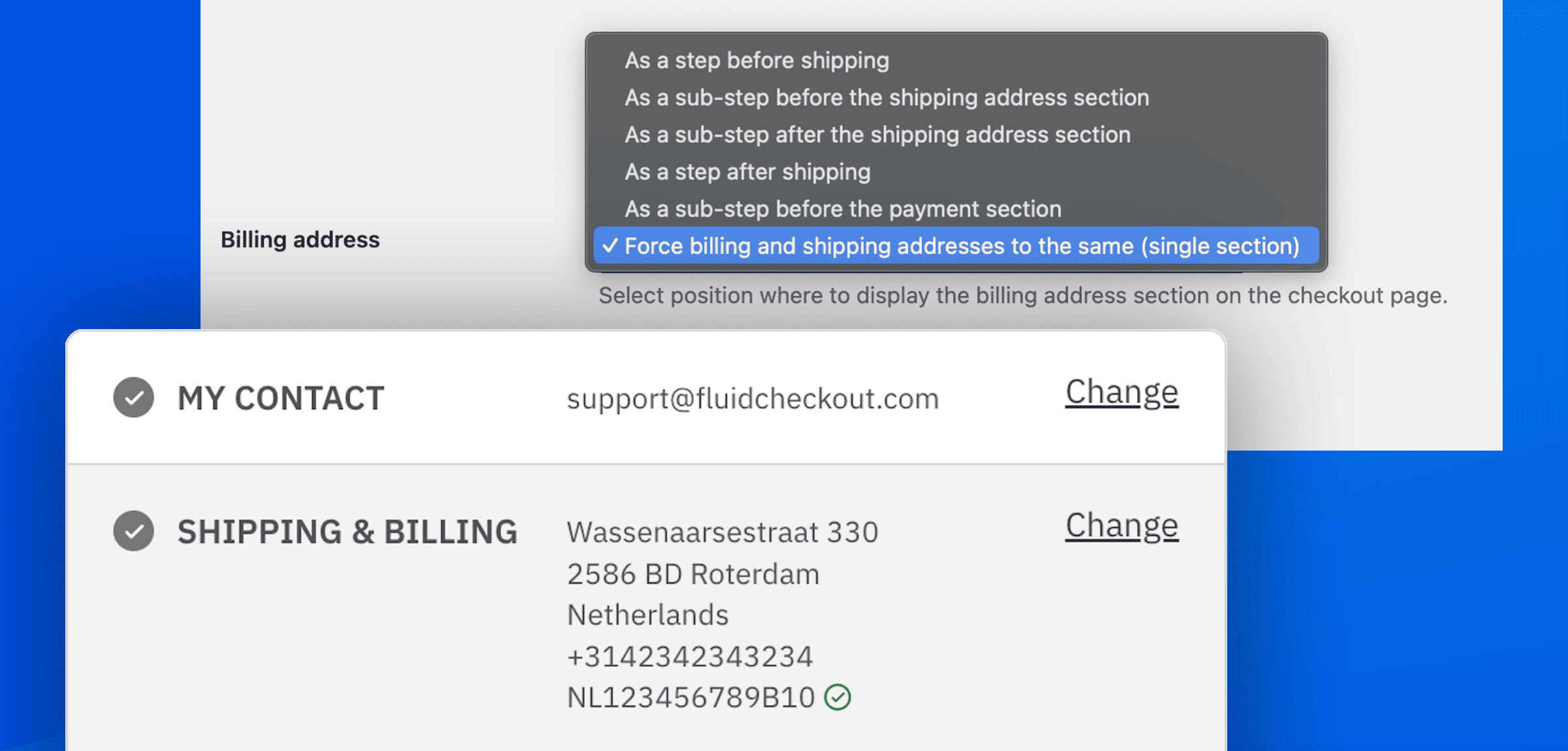
As a step or sub-step before shipping
Lite asks for shipping before billing — the natural flow for most stores. PRO adds the inverse when you mostly sell gifts or to other businesses: customers think about the invoice address first, then where to send the goods.
Choose billing as a step before shipping, or as a sub-step before the shipping address. The “Same as shipping address” checkbox is removed from billing and “Same as billing address” is added on shipping automatically.
Works with the Address Book add-on (saved addresses and the same-as option adapt to the selected position).
Force shipping and billing address to be the same
-
One address
Shipping and billing in a single section
-
Less typing
Customers never enter two addresses
-
EU-VAT
VAT fields sit below the address when using the add-on
Some stores should never collect a second address. PRO can force shipping and billing to the same place — one section, one set of fields.
This is one of the PRO billing-address positions (alongside billing before shipping, after shipping, or as a sub-step). The plugin handles the same-as checkbox so you do not need extra setup.
With the EU-VAT Assistant add-on, extra VAT fields and validation sit below the address when this option is selected.
Gift messages and packing slips
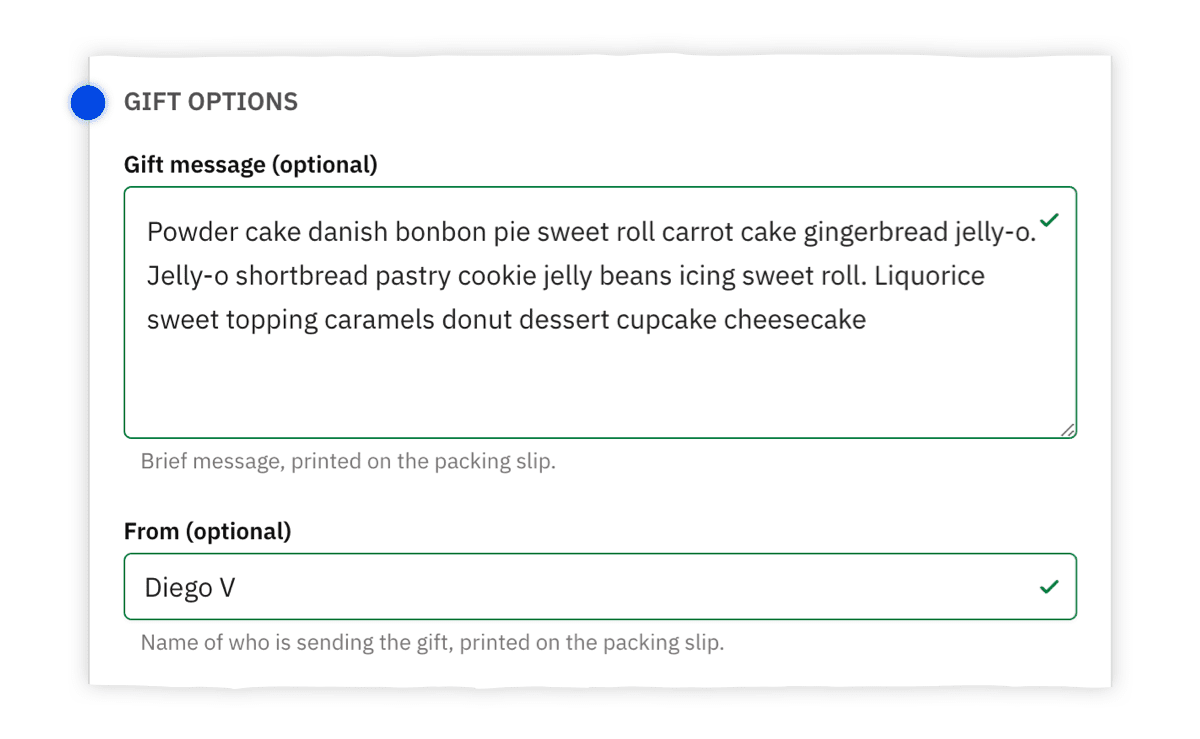
-
Gift message
An easy way to add a message to the order
-
Packing slips
Print on supported plugins, folded in half on the packaging
-
WPOvernight & SkyVerge
Compatible packing-slip plugins
Offer an easy way for your customers to add a gift message to their order.
You can then use gift messages to print a personalized gift card or print them on packing slips generated with supported plugins. When using a compatible 3rd-party plugin to generated the packing slip document, it can be folded in half and attached to the packaging to show the gift message.
Compatible plugins: WooCommerce PDF Invoices & Packing Slips – by WPOvernight; WooCommerce Print Invoices/Packing Lists – by SkyVerge.
Easily add trust symbols to the cart and checkout pages
-
Cart and checkout
Add any trust symbol to both pages
-
Guarantees, badges, reviews
Accepted payment methods, security badges, testimonials, or anything really
Boost the perceived trust customers have on your website.
Add any trust symbol to the cart and checkout pages such as guarantees, accepted payment methods, security badges, reviews, testimonials, or anything really.
International phone numbers
-
Formatted fields
Help customers avoid mistakes
-
Domestic or abroad
Useful whether you sell to customers abroad or not
-
Unambiguous
A format that cannot be misinterpreted
Whether you sell to customers abroad or not, the international phone number formatted fields will help your customers avoid mistakes, and ensure you collect the right phone numbers in a format that cannot be misinterpreted.
Account matching
-
Match on email
Guest orders associated with an existing account
-
No dead end
Fixes “An account is already registered with your email address”
Associate guest orders with the customer’s existing account based on their email address provided. Fix the pesky message “An account is already registered with your email address” WooCommerce throws when customers try to complete their purchase.
Works with what you do
Every WooCommerce store is different, and the checkout page is no exception. Fluid Checkout integrates with many of the most popular plugins and themes. New integrations are added with every update.
Integration with Themes (Shoptimizer, Astra, Blocksy, Flatsome, Divi, and many more)
-
Popular themes
Shoptimizer, Astra, Blocksy, Flatsome, Divi, Storefront, Kadence, and more
-
Your brand
Checkout still looks and feels like your own website
-
Classic form
Works with the WooCommerce shortcode checkout — not block-only builders
Fluid Checkout should work with most themes out of the box. We’ve tested popular WooCommerce themes — including Shoptimizer, Astra, Blocksy, Flatsome, and Divi — so the optimized checkout still matches the store.
If a theme is missing from the tested list, it does not mean it won’t work. Only that we have not tested it yet. Try it, and contact support if anything needs a fix.
Divi (and similar builders) must keep the classic [woocommerce_checkout] shortcode. Custom Divi checkout widgets replace that form and are not compatible. See the Divi compatibility guide.
Integration with Payment gateways (Stripe, PayPal, Amazon Pay, and many more)
-
Stripe & PayPal
Official gateways and popular Payment Plugins for Stripe / PayPal
-
Amazon Pay
WooCommerce Amazon Pay on the classic checkout form
-
Regional methods
Klarna, Mercado Pago, PagSeguro, Affirm, Authorize.Net, and others
Most payment gateways work out of the box because Fluid Checkout uses the classic WooCommerce checkout form. Stripe, PayPal, Amazon Pay, Klarna, and many regional methods are already tested.
If a gateway is not on the tested list, it does not mean it won’t work — only that we have not tested it yet. Gateways that only support the WooCommerce block checkout will not show their buttons here.
Need Apple Pay or Google Pay in one expected place? That’s the Express Checkout integration (Fluid Checkout PRO).
Integration with Shipping Method plugins
-
Carrier rates
Display shipping rates from your existing shipping plugins
-
Flexible Shipping
Table-rate and rule-based methods stay in the shipping step
-
Same checkout flow
Customers pick a method without leaving the optimized steps
Fluid Checkout was created so most shipping methods work out of the box. Customers still see carrier rates and pickup options in the shipping step — including plugins such as Flexible Shipping and WooCommerce Correios.
Some shipping plugins may need adjustments if they do not use WooCommerce standard hooks. If rates do not appear as expected, contact support and we’ll fix it.
Integration with Country specific plugins (Brazilian Market, Germanized, German Market, Hezarfen)
-
Brazilian Market
Local checkout fields and fiscal data for Brazil
-
Germanized & German Market
Invoice and legal checkout requirements for DACH stores
-
Hezarfen
Turkish invoice types and address details at checkout
Country-specific WooCommerce plugins add tax, invoice, and address fields the default checkout does not have. Fluid Checkout keeps those fields in the optimized steps so local stores stay compliant without a broken layout.
Tested plugins include Brazilian Market on WooCommerce, Germanized, German Market, and Hezarfen. New country integrations are added with plugin updates.
Integration with WooCommerce Subscriptions
-
Recurring checkout
Subscription products use the same Fluid Checkout steps
-
Shipping subtotals
Recurring shipping lines stay readable in the order summary
-
Existing plugins
Works with WooCommerce Subscriptions and related add-ons
Sell subscription products without dropping customers into a different checkout. WooCommerce Subscriptions runs on the same multi-step (or one-step) Fluid Checkout layout, including shipping and totals for recurring items.
Compatibility is maintained as WooCommerce and Subscriptions update — including shipping subtotal layout on the order summary.
Integration with checkout field customization plugins
-
Basic edits
Labels, placeholders, size, order, remove or add fields
-
Recommended editor
Checkout Field Editor for WooCommerce by ThemeHigh
-
Or a snippet
Native WooCommerce field hooks still work
Custom checkout fields can be added or changed on Fluid Checkout the same way as on the original WooCommerce checkout — with a fields editor plugin, or with a code snippet.
Lite covers basic changes: labels, descriptions, placeholders, CSS classes, field order (with documented caveats), removing fields, and adding custom fields. We recommend Checkout Field Editor for WooCommerce by ThemeHigh.
Conditional fields and custom sections need Fluid Checkout PRO plus ThemeHigh PRO. QuadLayers Checkout Manager is not compatible — use ThemeHigh instead.
Integration with Express Checkout payment methods (Google Pay, Apple Pay and Amazon Pay) PRO
-
One expected place
Compatible buttons display together, not scattered by each plugin
-
Google, Apple, Amazon
Plus browser Payment Request and other express methods
-
Enable in settings
Turn on the gateway’s buttons, then the Express checkout section
Each payment plugin adds express buttons in a different way — sometimes where they do not make sense. Fluid Checkout PRO shows compatible Google Pay, Apple Pay, Amazon Pay, and similar buttons in one Express Checkout section.
Supported gateways include Payment Plugins for Stripe / PayPal / Braintree, WooCommerce Stripe, WooCommerce Amazon Pay, WooCommerce Payments, Klarna Checkout, and other listed providers. See the Express Checkout guide.
Block-only gateways (and Amazon Payment Services) will not show buttons in this section.
Integration with supported order delivery date plugins PRO
-
Own sub-step
Delivery or pickup date sits in the optimal place in the form
-
Popular plugins
Kestrel, Iconic Delivery Slots, Tyche, CodeRockz (free and PRO)
-
Extra options
Integrations settings appear when the related plugin is active
Fluid Checkout PRO works with several popular plugins that add order delivery date or pickup date fields to checkout. Dates appear as a separate sub-step — or a full step — in the right place for the selected plugin settings.
Compatible plugins: Order Delivery for WooCommerce by Kestrel; Iconic Delivery Slots; Order Delivery Date Pro by Tyche Softwares; Delivery & Pickup Date Time by CodeRockz (free and PRO). Kestrel can show an inline calendar of available dates.
See the full list and options in Compatibility with Delivery Date or Pickup Date plugins.
Integration with supported points and rewards plugins PRO
-
Redeem at checkout
Points stay in the purchase flow instead of a side form
-
Earn on the order
Rewards messaging does not break the optimized steps
-
Supported plugins
WooCommerce Points and Rewards, WPLoyalty (free and PRO)
Loyalty programs only convert if customers can earn and redeem without leaving checkout. PRO keeps supported points and rewards fields in the Fluid Checkout layout.
Compatible plugins include WooCommerce Points and Rewards and WPLoyalty. If you use another loyalty plugin, contact support — new integrations are added with updates.
Integration with Checkout Field Editor PRO by ThemeHigh PRO
-
Conditional fields
Show or hide fields from ThemeHigh PRO rules
-
Custom sections
Extra sections become checkout sub-steps
-
Both PRO plugins
Needs Fluid Checkout PRO and ThemeHigh PRO
Lite already works with basic ThemeHigh field edits. Advanced features — conditional fields and custom sections — need Fluid Checkout PRO and Checkout Field Editor PRO by ThemeHigh together.
ThemeHigh is the field editor we recommend and test for full compatibility. Custom sections show as sub-steps with review text. Prefer Fluid Checkout’s Google Address Autocomplete add-on over ThemeHigh Address Autofill.
Integration with Amazon Pay express checkout PRO
-
WooCommerce Amazon Pay
The official Amazon Pay plugin for WooCommerce
-
Express section
The Amazon Pay button sits with other express methods
-
Not APS
Amazon Payment Services is not compatible with this feature
PRO places the WooCommerce Amazon Pay express button in the same Express Checkout section as Google Pay and Apple Pay — where customers expect a fast-pay option, not buried in a random step.
Enable Amazon Pay in WooCommerce Payments settings, then enable Fluid Checkout’s Express checkout section. This is a dedicated Amazon Pay integration on top of the general Express Checkout feature.
Use WooCommerce Amazon Pay. Amazon Payment Services will not show an express button here.
Fluid Checkout PRO
Reasonable price, consistent purchase experience.
Affordable annual plans with 1-year of updates and support. The best tools to further improve your WooCommerce checkout conversion rate and make the purchase experience consistent on the entire journey.
Fluid Checkout PRO+ Complete bundle
226 EUR when purchased separately *
129 EUR / year
+ taxes if applicable.
The complete bundle with Fluid Checkout PRO and all the add-ons.
Purchase PRO+ BundleFree 15-min setup call with every purchase
- All Fluid Checkout PRO features, plus…
-
Avoid delivery delays and unsatisfied customers. Collect the correct address information from the first time they buy with you.
-
Let customers save multiple shipping and billing addresses on their account and choose which ones to use at checkout and cart pages.
-
Collect and validate EU VAT numbers at the checkout page, distinguish B2B and B2C transactions. For EU businesses with a valid VAT number, removes tax charges on reverse charge basis before completing the payment process.
-
Includes add-ons we launch in the future, for as long as your subscription is active. The bundle plan does NOT include completely separate products we may launch in the future.
-
Activations for the number of sites selected in the tab.
- 1 year of updates
- 1 year of support
Fluid Checkout PRO
99 EUR / year
+ taxes if applicable.
Design templates, optimized cart and order received pages, account matching, and much more.
Purchase PROFree 15-min setup call with every purchase
-
Choose from Classic, Boxed, Split and Minimalist design templates. With the Split design template, your checkout will look similar to Shopify’s checkout.
-
Same look and feel for all the steps of the customer purchase journey. From the cart, to checkout, order pay and order received pages.
-
Optimized layout and features for the checkout page to improve conversion rates on your website.
-
Optimized layout and features for the cart page with cart items and totals always updated.
-
Optimized layout and features for the order received page (a.k.a “thank you” page) which is displayed after the customer completes an order.
-
Let customers edit quantity of cart items or remove items from their cart directly at the checkout page.
-
Prompt registered customers to log in, or allow them to complete an order without logging in. Fixes the annoying error message for registered customers at the very end of the checkout form.
-
Displays all express checkout buttons before the checkout steps when using supported payment methods.
-
– Trust symbols on the cart, order pay and thank you pages – More positions for the billing address section on the checkout page – More positions for the coupon code on the checkout page – Integrated coupon code field on the cart page – International phone numbers – Gift messages and packing slips templates – Simple local pickup and in-store collection – Optimized order pay page
-
Activations for the number of sites selected in the tab.
- 1 year of updates
- 1 year of support
Fluid Checkout PRO+ Complete bundle
1130 EUR when purchased separately *
249 EUR / year
+ taxes if applicable.
The complete bundle with Fluid Checkout PRO and all the add-ons.
Purchase PRO+ BundleFree 15-min setup call with every purchase
- All Fluid Checkout PRO features, plus…
-
Avoid delivery delays and unsatisfied customers. Collect the correct address information from the first time they buy with you.
-
Let customers save multiple shipping and billing addresses on their account and choose which ones to use at checkout and cart pages.
-
Collect and validate EU VAT numbers at the checkout page, distinguish B2B and B2C transactions. For EU businesses with a valid VAT number, removes tax charges on reverse charge basis before completing the payment process.
-
Includes add-ons we launch in the future, for as long as your subscription is active. The bundle plan does NOT include completely separate products we may launch in the future.
-
Activations for the number of sites selected in the tab.
- 1 year of updates
- 1 year of support
Fluid Checkout PRO
199 EUR / year
+ taxes if applicable.
Design templates, optimized cart and order received pages, account matching, and much more.
Purchase PROFree 15-min setup call with every purchase
-
Choose from Classic, Boxed, Split and Minimalist design templates. With the Split design template, your checkout will look similar to Shopify’s checkout.
-
Same look and feel for all the steps of the customer purchase journey. From the cart, to checkout, order pay and order received pages.
-
Optimized layout and features for the checkout page to improve conversion rates on your website.
-
Optimized layout and features for the cart page with cart items and totals always updated.
-
Optimized layout and features for the order received page (a.k.a “thank you” page) which is displayed after the customer completes an order.
-
Let customers edit quantity of cart items or remove items from their cart directly at the checkout page.
-
Prompt registered customers to log in, or allow them to complete an order without logging in. Fixes the annoying error message for registered customers at the very end of the checkout form.
-
Displays all express checkout buttons before the checkout steps when using supported payment methods.
-
– Trust symbols on the cart, order pay and thank you pages – More positions for the billing address section on the checkout page – More positions for the coupon code on the checkout page – Integrated coupon code field on the cart page – International phone numbers – Gift messages and packing slips templates – Simple local pickup and in-store collection – Optimized order pay page
-
Activations for the number of sites selected in the tab.
- 1 year of updates
- 1 year of support
Fluid Checkout PRO+ Complete bundle
5650 EUR when purchased separately *
599 EUR / year
+ taxes if applicable.
The complete bundle with Fluid Checkout PRO and all the add-ons.
Purchase PRO+ BundleFree 15-min setup call with every purchase
- All Fluid Checkout PRO features, plus…
-
Avoid delivery delays and unsatisfied customers. Collect the correct address information from the first time they buy with you.
-
Let customers save multiple shipping and billing addresses on their account and choose which ones to use at checkout and cart pages.
-
Collect and validate EU VAT numbers at the checkout page, distinguish B2B and B2C transactions. For EU businesses with a valid VAT number, removes tax charges on reverse charge basis before completing the payment process.
-
Includes add-ons we launch in the future, for as long as your subscription is active. The bundle plan does NOT include completely separate products we may launch in the future.
-
Activations for the number of sites selected in the tab.
- 1 year of updates
- 1 year of support
Fluid Checkout PRO
499 EUR / year
+ taxes if applicable.
Design templates, optimized cart and order received pages, account matching, and much more.
Purchase PROFree 15-min setup call with every purchase
-
Choose from Classic, Boxed, Split and Minimalist design templates. With the Split design template, your checkout will look similar to Shopify’s checkout.
-
Same look and feel for all the steps of the customer purchase journey. From the cart, to checkout, order pay and order received pages.
-
Optimized layout and features for the checkout page to improve conversion rates on your website.
-
Optimized layout and features for the cart page with cart items and totals always updated.
-
Optimized layout and features for the order received page (a.k.a “thank you” page) which is displayed after the customer completes an order.
-
Let customers edit quantity of cart items or remove items from their cart directly at the checkout page.
-
Prompt registered customers to log in, or allow them to complete an order without logging in. Fixes the annoying error message for registered customers at the very end of the checkout form.
-
Displays all express checkout buttons before the checkout steps when using supported payment methods.
-
– Trust symbols on the cart, order pay and thank you pages – More positions for the billing address section on the checkout page – More positions for the coupon code on the checkout page – Integrated coupon code field on the cart page – International phone numbers – Gift messages and packing slips templates – Simple local pickup and in-store collection – Optimized order pay page
-
Activations for the number of sites selected in the tab.
- 1 year of updates
- 1 year of support

30-day money-back guarantee
At Fluid Checkout, we want you to be 100% happy with your purchase.
We offer a 30-day money-back guarantee if you are not satisfied with our products.

Founder
Frequently asked questions
Is the plugin translation ready? Which languages do you support?
Yes.
All labels and texts added or changed by the plugin are translatable using the built-in WordPress functions.
Fluid Checkout and its add-ons are translated into 83 languages out of the 132 languages supported by WordPress, which should include all the most used languages.
Does it work with RTL languages?
Yes.
All features are optimized to work with RTL languages and the layout will adapt accordingly.
Is it compatible with my theme?
Yes.
Fluid Checkout should work with most themes out-of-the-box. However some themes may need adjustments because they might not be using WooCommerce standard hooks or styles, or if they add their own customizations which might conflict with Fluid Checkout.
If you have any issues using Fluid Checkout with your theme please let contact us and we’ll fix it asap.
Can I use my theme’s header and footer?
Absolutely.
While we recommend using the distraction-free checkout page template which replaces the theme header and footer, there is an option in the plugin settings to allow you to use your theme’s header and footer.
Just be aware that some features might not work well when using your theme’s header and footer. If you experience any issues, please let us know and we’ll fix it asap.
Will it work with my payment gateway plugins?
Yes.
Fluid Checkout was created in a way that most payment gateways should work out-of-the-box However, some payment plugins may need adjustments.
If you have any issues using Fluid Checkout with your payment gateways please let contact us and we’ll fix it asap.
Will it work with my shipping plugins and display shipping rates from carriers?
Yes.
Fluid Checkout was created in a way that most shipping methods should work out-of-the-box. However, some shipping plugins may need adjustments.
If you have any issues using Fluid Checkout with your shipping plugin please let contact us and we’ll fix it asap.
Is the plugin compliant with privacy laws (GDPR / RGPD / CCPA / LGPD)?
We value your privacy and your customers’ privacy.
While we cannot guarantee that the plugin is fully compliant with privacy laws in every country.
We assure you that Fluid Checkout does not, and will not, collect any customer data from your shop.
In the future, and with your explicit consent, we might collect some non-sensitive usage data from your website such as the plugin and WooCommerce settings, which other plugins and themes you have installed on your shop to help us to improve the plugin.
Details and examples of the data collected will be shown on the plugin interface for you to review prior to sending the data to our servers for collection and storage.
Is the plugin fully accessible and compliant with ADA/WCAG 2.1 Level AA requirements? Will it make my web shop compliant?
No.
While Fluid Checkout does improve the accessibility of the checkout page by implementing support for keyboard-only navigation and screen readers, we can’t say if your web shop will be 100% compliant or not with ADA, WCAG or any other accessibility requirements.
Did you know that only about 30% of accessibility issues can be detected with automated tools? The majority of the issues can only be detected with manual testing on each page of the website.
Read the article: Automated Accessibility Testing Tools: How Much Do Scans Catch?.
We have plans to add an “accessible layout” feature that will ensure most accessibility issues will be fixed.
Can I use my license in a development or staging environment?
Yes.
Usually the development or staging site will not count towards you activation limits.
If you have any issues please contact us and we’ll fix it for you.
Can I change the domain associated with my license?
Yes.
Currently the license key is not associated with your domain and will reach its limit based on how many times the plugin was activated. We’ll add domain management to the license system soon.
If you need to move the license from one website to another, please contact us.
What happens if I do not renew my license or subscription?
Your subscription will renew automatically every year until you decide to cancel it.
You can cancel your subscription at any time from your account dashboard.
If your subscription is cancelled or in case the payment fails, the plugins will continue to work including the PRO features, but you won’t have access to updates and support.
Can I purchase one license and upgrade later paying only the difference?
Sure. Once you purchase the 1-site license or 5-sites license, we will generate a discount code for you to purchase an upgrade license paying only the difference.
Currently, you need to contact us to get your discount code.
Why customers love Fluid Checkout
It’s amazing!
★★★★★
“Our conversion rate in the cart has increased by 36%. It’s amazing. We have already ordered the plugin for our second website, where it also works flawlessly.”

Michal Havel
Insanely Good
★★★★★
“Turned a confusing and bareboned WooCommerce checkout into a converting one very easily. Cheers!”

@snowiron
Insane how great this is!
★★★★★
“This plugin radically modernizes and cleans up the WooCommerce checkout. While doing a better job at UX & Conversion Optimization, it’s also more compatible with plugins…”

@allancaeg
Whole customer experience has improved 100%
★★★★★
“Free version was great but PRO is awesome well worth the money made a big difference to my site … its paid for itself already.”

Sean Owen
Fluid Checkout PRO is great
★★★★★
“I looked at many checkout plugins and this was the best. Highly recommend.”

chris k
Fluid Checkout PRO and Support is FANTASTIC!
★★★★★
“PRO features and support that make a real difference when optimizing WooCommerce checkout.”
mikef
Agency partners
Built into how conversion teams ship checkout
Blaze Commerce uses Fluid Checkout PRO whenever a site optimization touches checkout.
Henry Holsters
AOV up 15%. Items per order up 37%.
Hang Logic
Net sales up 82%. Orders up 45%. AOV up 25%.
Shine Trim
Net sales up 39%. Orders up 28%.
Results reported by Blaze Commerce from their full WooCommerce work. Fluid Checkout PRO is the checkout layer in that stack.
Stop losing sales where it matters the most
Fluid Checkout PRO turns a friction-heavy checkout into a purchase experience customers actually finish.
30-day money-back guarantee — be 100% happy with your purchase.